


There’s a specific moment most small business owners eventually experience. It doesn’t happen on day one, and it doesn’t usually show up in the early “everything is new” phase either. It tends to appear somewhere between survival and scale—when revenue is coming in, clients are active, your calendar is full, and from the outside it looks like the business is doing well.
But internally, something feels off.
You’re busy—constantly busy—yet you don’t feel fully in control. You’re not exactly sure how many active leads are in play right now, what revenue is still pending, which follow-ups are overdue, where bottlenecks are forming, or whether something important is slipping through the cracks. Nothing is technically broken, but nothing feels organized either, and that low-level friction becomes exhausting over time.
That’s usually what pushes people to search:
- How to organize a small business
- Best software to run a small business
- Why does my business feel chaotic?
- Square alternative for business management
The search isn’t about features. It’s about clarity—about wanting the business to feel calmer and more predictable. And clarity is rarely solved by adding another app.
This article is the “master explanation” for why small businesses feel disorganized as they grow, and what to do about it in a way that actually sticks. We’ll talk about the common tool stack most owners rely on (payments, scheduling, contracts, and a few random systems that “kind of work”), the real reason it still feels messy, and the practical structure that turns daily operations into something you can manage without being the human glue holding everything together.
We’ll also introduce how a business operating system approach—specifically the way KyznOS is designed—helps owners centralize clarity and automate the repetitive parts of running the business without creating more complexity.
The Growth Trap No One Warns You About
Most small businesses are not designed. They’re assembled.
You start with what you need in the moment. You choose a payment processor—often something like Square because it’s simple, widely accepted, and doesn’t require a complicated setup. You add scheduling through Acuity Scheduling or a similar booking tool because you need clients to self-book and stop playing calendar ping-pong. You organize contracts and client flows through HoneyBook or whatever platform your industry recommends because you want to look professional and reduce back-and-forth.

Each decision makes sense individually. Each tool solves a real problem.
But growth doesn’t happen in isolated problems. It happens in layers.
As volume increases, what used to be manageable in your head becomes operationally complex. What used to be five transactions becomes fifty. What used to be one service becomes three offers, add-ons, packages, or recurring billing. What used to be a solo effort becomes a team dynamic where multiple people touch a client, a job, or a workflow.
The tools remain the same. The structure does not.
That’s where disorganization begins—not because of incompetence, but because the business outgrew its original setup. The early-stage approach of “I’ll remember it” stops working, and the business starts charging you interest in the form of stress: missed follow-ups, inconsistent onboarding, unclear pipelines, and a constant sense that you’re always reacting to something you should have seen coming.
Disorganized Doesn’t Mean Failing
It’s important to clarify something: when a small business feels disorganized, it doesn’t automatically mean it’s failing. In fact, it often means the opposite.
Disorganization tends to show up when there’s demand, momentum, and activity. You’re getting leads. You’re booking work. You’re receiving payments. People are asking questions. Things are moving.
The real issue is that the internal structure didn’t scale at the same speed as the external growth.
If the problem were revenue, the solution would be marketing. If the problem were skill, the solution would be training. But when the problem is that the business feels chaotic despite growth, the solution is almost always the same: structure.
Structure doesn’t mean rigidity. It means the business has a predictable “way it runs,” even when the owner is busy, distracted, or working across multiple projects. When structure is in place, the business stops depending on your memory and starts depending on a process.
And that’s when things get easier—without the business slowing down.
What Disorganization Actually Looks Like in Real Life
“Disorganized” can sound vague until you put it into real scenes. For most business owners, it shows up in a handful of repeating patterns that feel small in the moment but add up to major friction over time.
Scenario 1: The Lead That Vanishes
A lead messages you on Instagram. You respond quickly. They ask for pricing. You send it. They say they’ll “get back to you,” and then the conversation disappears into the void of daily life.
A few days later, you remember them. You scroll through DMs trying to find the thread. You follow up, but you’re not sure what tone to use because you can’t remember if they sounded interested or just curious. They don’t respond, and now you’re left wondering if you lost a real client or if it was never serious to begin with.
The hard part is that it doesn’t feel like one missed lead. It feels like a pattern you can’t control. Over time, it creates a sense of distrust in your own process.
Scenario 2: The “Where Are We At?” Question
You’re talking to someone and they ask: “How’s business going?”
You’re busy, so you say, “It’s going good.” But internally, the truth is more complicated. You’re not sure how many leads are active, how many quotes are pending, what’s expected to close this week, and what revenue is still outstanding.
You’re working hard, but you don’t have a clean way to measure the pipeline and what it’s going to produce. That’s not just an admin issue—it affects decision-making, hiring, marketing, and how confident you feel.
Scenario 3: A Team Member Asks for Clarity
You hire help. Now you have someone asking you questions that expose the gaps.
“Which clients need follow-up today?”
“Who’s waiting on payment?”
“What’s the next step for this lead?”
“Did we send the onboarding email?”
If the answers live in your head, you become the bottleneck. If your systems are spread out, you can’t answer quickly without checking multiple tools. The business feels heavier because leadership now includes constant coordination.
Scenario 4: The Week That Feels Busy But Doesn’t Feel Productive
Monday is packed. Tuesday is packed. Wednesday is packed. Your calendar says you were productive, but by Friday you don’t feel ahead. You feel like you ran all week and still didn’t create order. You may have delivered great work, but operationally, you feel behind.
That’s often the moment people search how to organize a small business. Not because they want to be “more productive,” but because they want the day-to-day to stop feeling like it’s held together by mental effort.
The App Illusion
When owners feel operational pressure, the instinct is almost always to add another tool. It feels logical.
If scheduling feels messy, upgrade scheduling. If invoicing feels clunky, change payment tools. If follow-ups are inconsistent, add a CRM. Every platform promises optimization, and many of them are genuinely useful in their lane.
But optimization without integration creates fragmentation.
You end up with payments in one place, bookings in another, contracts somewhere else, client notes in a document, marketing in a separate dashboard, and tasks in your head. Everything works independently. Nothing works together.
And when nothing works together, you become the system.
You are the one connecting data across platforms. You are the one checking five dashboards to answer one question. You are the one mentally stitching together what your business looks like this week.
That is not scalable. It’s manual coordination disguised as productivity.
This is why people can have “good tools” and still feel disorganized. The tools manage slices of the business. They don’t manage the business.
How to Organize a Small Business Without Adding More Apps
When most people search how to organize a small business, they assume the answer is another tool. Another subscription. Another dashboard. But organization doesn’t start with software — it starts with structure.
Understanding how to organize a small business properly means stepping back and looking at the architecture behind the activity — not just the activity itself.
Why It Feels Harder Than It Should
At some point, most owners start thinking: “This shouldn’t feel this complicated.”
They’re right.
Running a business is demanding, but it shouldn’t feel like you’re constantly trying to keep plates from falling. If you have to check five different places just to answer a simple question like “Who’s waiting on a quote?” or “Who hasn’t paid yet?” or “What do I need to follow up on today?” then the issue isn’t effort. It’s that everything is spread out.
You’re doing the work, and you’re also doing the job of holding the business together. That second job—the invisible job—is what drains people.
Most owners don’t burn out because the service is hard. They burn out because the business requires constant mental tracking, constant follow-up, and constant context switching. That’s what makes the business feel heavier than it needs to be.
When it feels that way, the missing piece is usually not a new app. It’s a central system that ties the pieces together.
What It Actually Means to Organize a Small Business
When people search “how to organize a small business,” they often picture productivity habits: declutter the desk, clean up the inbox, color-code the calendar, set better boundaries, and get more disciplined.
Those things help, but they’re not the core issue.
Operational organization is deeper than surface tidiness. To truly organize a small business, you need a setup that reduces reliance on memory and creates predictable flow.
An organized business is not perfect. It’s simply structured enough that you can see what’s happening and what needs to happen next, without guessing.
That means you can answer, at any time:
- Where are my leads right now?
- What is the next step for each one?
- What tasks are open and who owns them?
- What revenue is pending and what’s expected?
- What needs attention today versus later?
If answering those requires checking multiple tools or replaying conversations in your head, the business may be operating, but it is not organized.
The Five Structural Elements Every Organized Business Has
These five elements are the difference between “I’m always behind” and “I’m in control.” They’re also the foundation that allows automation to work properly instead of creating more noise.

1) A Unified Lead Pipeline
A lead pipeline is not just a list of contacts. It is a progression that shows where each prospect stands and what needs to happen next.
Inquiry → Qualified → Quote Sent → Follow-Up Needed → Booked → Paid → Completed → Retention / Repeat.
Most small businesses lack visibility at one or more of these stages. Leads sit in inboxes. DMs get lost. Quotes go untracked. Follow-ups depend on memory. Without a pipeline, growth becomes unpredictable because you can’t see what’s moving and what’s stuck.
If your pipeline is unclear, your marketing becomes guesswork. You can’t confidently answer whether you need more leads or better follow-up, because you can’t clearly see what’s happening after someone reaches out.
2) A Clear Task System With Ownership
Tasks should not live in memory. They should live in a system with ownership, status, deadlines, and visibility. When tasks live in text messages, sticky notes, or mental reminders, stress increases exponentially, especially as volume grows.
A task system is what makes delegation possible. If you can’t clearly assign tasks, track them, and confirm completion without asking people directly, you are running a people-powered process instead of a system-powered process.
3) A Defined Onboarding Flow
Many businesses close clients successfully, but onboarding remains improvised. Missing documents, delayed communication, inconsistent instructions, and too much back-and-forth are common, especially in service businesses and local operations.
A defined onboarding flow creates consistency. It reduces client confusion, reduces internal scrambling, and improves the professional feel of the business. It also makes automation possible in a clean way, because onboarding becomes a repeatable sequence rather than an ad-hoc set of steps.
4) Revenue Visibility Beyond Transactions
Payment processors show transactions. They do not always show operational health.
Revenue visibility answers what’s projected, what’s pending, what’s delayed, what’s recurring, and what stage revenue is currently in. Without that clarity, decision-making becomes guesswork. Owners end up checking payment logs to understand whether they’re “on track,” which is reactive and stressful.
Revenue visibility is not about obsessing over numbers. It’s about having enough clarity to plan, hire, and invest without guessing.
5) Executive Dashboard Oversight
This is the most overlooked layer. An executive dashboard is not vanity metrics. It’s a single place where you can see the business at a glance: active leads, open tasks, upcoming deadlines, revenue forecast, and marketing signals.
Without that view, leadership becomes fragmented. You’re always switching context, always checking multiple sources, always reacting late.
With it, you can run the business rather than chase it.
If you’re serious about learning how to organize a small business properly, you need more than tools — you need architecture.
Why the Top 3 Apps Still Leave a Gap
Let’s address the reality most owners are living in.
Payment platforms like Square are powerful. Scheduling platforms like Acuity Scheduling are efficient. Client platforms like HoneyBook can be great for contracts, proposals, and a polished client experience.
But their scope is limited. They manage events. They do not manage the entire business.
They handle transactions. They do not govern the full lead-to-client flow. They aren’t built to show the whole business in one view.
This doesn’t make them bad. It makes them incomplete as an operating structure.
When a business relies on transactional tools to provide structural clarity, the result is misalignment. The tools may function perfectly, but the business still feels messy because the missing layer is the place where those events connect.
This is why someone can have a scheduler, a payment tool, and a client portal and still feel disorganized. The core challenge isn’t features—it’s cohesion.
The Breaking Point No One Plans For
There’s a quiet shift that happens in growing businesses.
At first, you are the business. Every client runs through you. Every decision passes through you. Every update sits in your awareness. That stage feels intense, but it also feels clear because the volume is still manageable.
Then growth begins to layer itself in. More inquiries. More moving pieces. More recurring tasks. More communication threads. More decisions that don’t fit cleanly into a single day.
Instead of feeling busy and productive, you start feeling busy and scattered. You open your laptop in the morning and think, “What actually needs my attention first?” You close it at night wondering, “Did I miss something?”
That tension isn’t about effort. It’s about not having a reliable system to carry the load.
At this stage, most owners don’t need motivation. They need organization that works in real life, not just in theory.
Automation Is What Business Owners Really Want (But It Has a Catch)
Here’s the truth: business owners love automation because automation feels like freedom. It’s not about being “techy.” It’s about reclaiming mental space.
Owners want fewer manual touches. They want the repetitive steps handled without them thinking about it every time. They want the business to keep moving even when they’re busy, in meetings, delivering service, or off the clock. This is where most people searching how to organize a small business get it wrong — they try to automate chaos instead of structuring it first.
But here’s the catch: automation doesn’t fix chaos. It amplifies whatever structure exists.
If the flow is unclear, automations create noise. They trigger the wrong actions. They send reminders at the wrong time. They spam people. They create tasks no one owns. Owners then conclude “automation doesn’t work,” when the real problem is that the business never defined the flow that automation is supposed to follow.
Automation is powerful when structure exists first.
When structure exists, automation becomes a multiplier. It removes repetition. It reduces mental load. It creates consistency. It protects follow-up. It makes the business feel lighter.
So the goal isn’t “automate everything.” The goal is “build a business flow that can be automated cleanly.”
What Smart Automation Actually Looks Like
Smart automation is not random. It is tied to milestones.
When something happens, the system responds predictably.
Here are practical examples of what business owners actually want automated:
- When a lead submits a form, they automatically enter the pipeline and a follow-up task is created.
- When a lead books, the lead stage updates and onboarding steps begin automatically.
- When an invoice is sent, reminders follow a schedule without the owner chasing payment.
- When a client pays, the project status updates and internal tasks are assigned.
- When a job is completed, a follow-up request for a review is triggered.
- When a lead goes cold, it’s flagged for a reactivation campaign instead of being forgotten.
Notice the pattern: automation is not “doing everything.” It’s removing repetitive admin work that steals focus.
That’s how owners get space back.
A Simple Before-and-After: Manual Business vs. Structured Business
Let’s make this tangible.
Before: Manual coordination
A new lead reaches out. You respond. You quote. You follow up when you remember. They book. You send payment instructions. You create internal notes somewhere. You manually create tasks. You tell your team in a text message. You double-check later because you’re not sure it got done.
Even when you’re doing it well, it’s a lot of touches.
The business is running, but it’s running on you.
After: Structured flow + automation
A lead reaches out. They enter the pipeline automatically. The next action is visible. When they book, the stage updates. When they pay, onboarding triggers. Tasks are assigned to the correct person. Reminders run without you chasing. Revenue visibility updates so you can see what’s pending and what’s forecasted.
The work still happens. The value still gets delivered.
But the business stops feeling like it requires constant mental bandwidth to hold together.
That’s the difference between “busy” and “organized.”
Introducing the Concept of a Business Operating System
We’re not turning this into a pitch. But we do need to name the missing layer clearly.
A payment processor is not a business management system. A scheduling tool is not a business operating system. A client portal is not a central command center.
Those tools are important, but they are not designed to be the place where the business is truly managed end-to-end.
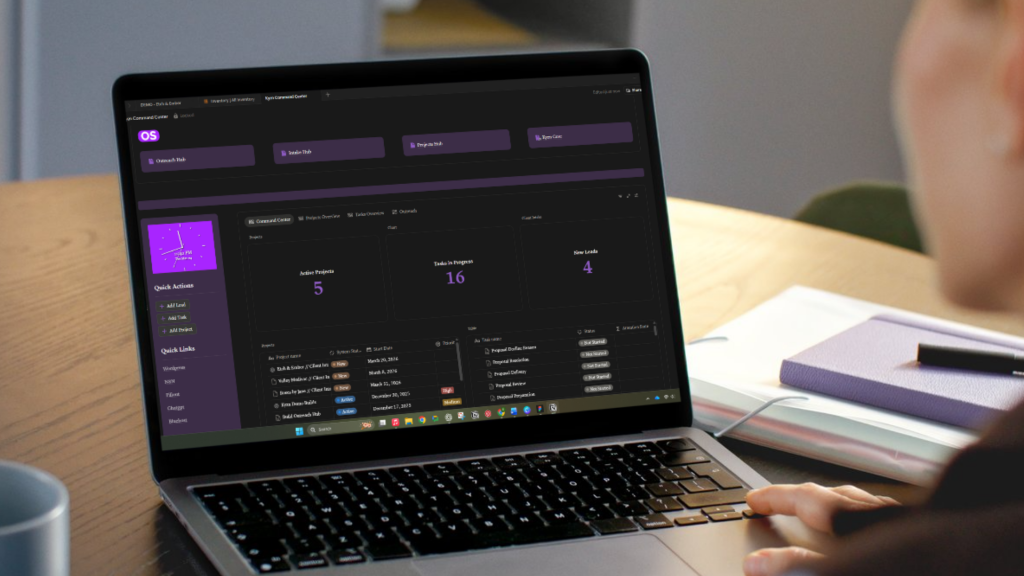
A business operating system is the central layer that ties everything together. It holds the pipeline. It holds the tasks. It holds the workflows. It provides a single view of what’s happening.
Think of it as the “home base” for your operations.
Instead of scattering the business across apps, an operating system gives the business a center.
And once a business has a center, automation becomes clean and reliable because there’s a clear structure to automate.
Where KyznOS Fits (And Why It Exists)
KyznOS exists for the specific gap most small business owners hit after they outgrow basic tools.
KyznOS is not built to replace what’s working. If you like Square for payments, you can keep Square. If Acuity Scheduling handles your bookings well, you can keep Acuity. If you use HoneyBook for contracts and proposals, you can keep HoneyBook.
KyznOS is designed to sit above those tools and organize the business around a structured flow.
Instead of asking you to run your business inside five different apps, KyznOS gives you one central command center where the real business management happens:
- Leads are tracked in a clear pipeline.
- Each lead has a next action.
- Follow-up is visible and structured.
- Tasks are assigned with ownership.
- Projects and clients move through defined stages.
- Revenue is visible beyond transactions.
- Automation runs based on real business milestones, not random triggers.
In other words, KyznOS turns “apps + memory” into “system + clarity.”
This is why KyznOS resonates with owners who feel like they’re doing everything right but still feel scattered. It’s not that they need more tools. It’s that they need one place where everything connects.
Why This Matters More Than Most People Realize
Operational disorganization isn’t just annoying. It costs money, time, and energy.
It costs money when leads fall through cracks, follow-up doesn’t happen, and prospects choose a competitor because they heard back faster. It costs money when payments are missed, invoices aren’t sent promptly, or recurring revenue isn’t tracked cleanly.
It costs time when the owner constantly checks tools, searches for messages, confirms details, and repeats the same steps manually. It costs energy because the brain is always “on,” always scanning for what might be missing.
This is why some businesses plateau. Not because demand is gone. Because operations become too heavy to scale without structure.
When you organize operations properly, you don’t just become “more efficient.” You become more confident, more consistent, and more capable of growth.
That is the real benefit.
How to Actually Fix the Disorganization
If you’re serious about learning how to organize a small business in a way that lasts, you need a method that goes deeper than “try this tool.”
Here is a practical approach that works across industries.
Step 1: Map the journey from first contact to repeat client
Write it down simply. Where do leads come from? What happens next? Where do they get stuck? Where do you lose them? Where do you feel the most friction?
If you can’t clearly define the stages, you can’t reliably organize or automate them.
Step 2: Define your pipeline stages in plain language
Stages should be obvious. A lead should not sit in “maybe” forever.
Examples: New Lead → Contacted → Quote Sent → Follow-Up Needed → Booked → Paid → Active → Completed → Repeat / Referral.
The point isn’t having perfect stages. The point is having visible flow.
Step 3: Choose one place to hold the “source of truth”
Where does the business live? Where do you go to see what’s happening?
If the answer is “depends,” that’s the problem. You need one place where the truth lives and everything else supports it.
Step 4: Convert memory-based tasks into system-based tasks
Any time you say “I’ll remember to…” that’s a signal to create a task.
Follow-ups, reminders, onboarding steps, payment checks, review requests—these should not live in your head.
Step 5: Add automation only after the flow is clear
Automation should support milestones, not chaos.
Start with simple triggers: lead created, booking scheduled, payment received, project completed. Automate the repetitive steps around those milestones.
Step 6: Create an executive view you can check daily
The goal is a “today view” that gives you clarity fast.
You should be able to open it and instantly see:
- who needs follow-up
- what tasks are due
- what revenue is pending
- what’s booked next
- what’s stuck
This is how the business becomes manageable without you constantly checking everything.
What This Looks Like Across Different Businesses
One reason this approach works is that it doesn’t depend on the industry. It depends on flow.
A home services business, a salon, a photographer, a cleaning company, a landscaping company, a consultant—different offers, same operational truth: leads become clients through stages, work gets delivered through tasks, and revenue needs clarity.
Once you build the structure, your industry becomes a detail, not a barrier.
This is why “business systems for small business” is becoming a bigger conversation. Owners don’t want to be cobbling together tools forever. They want something that feels like it was designed for running the business, not just transacting inside it.
The Real Goal: Operational Confidence
At its core, organization is not about perfection. It’s about confidence.
Confidence that nothing is slipping through cracks. Confidence that revenue is visible. Confidence that tasks are owned. Confidence that leads are flowing predictably. Confidence that the system works even when you’re not watching it constantly.
That confidence changes everything.
It changes how you sell because you know your pipeline. It changes how you market because you can measure what’s working. It changes how you hire because you have a process to plug people into. It changes how you plan because you can forecast based on real data, not vibes.
Without structure, growth feels risky.
With structure, growth feels intentional.
If You Want a Quick Self-Check
If you’re unsure whether you’re “at the stage” where structure matters, these questions are usually enough:
- Can you see exactly how many leads are active right now without checking multiple apps?
- Do you have a reliable follow-up system, or does it depend on memory?
- Could someone on your team run the day-to-day without asking you for context constantly?
- Can you forecast next month’s revenue with confidence?
- Do you feel calm about operations, or do you feel like you’re always catching up?
If most of those answers are “not really,” you’re not failing. You’re scaling without structure.
And that is fixable.
Final Reflection
If your small business feels disorganized right now, it is not a personal flaw. It is usually a structural gap. It is what happens when revenue grows faster than the business setup.

The solution isn’t hustle. It’s design.
The goal is not to add more random apps. The goal is to create one clear operating system for the business—one that holds the pipeline, the tasks, the process, the visibility, and the automation that frees your mind.
That is why KyznOS exists. It’s built to help growing small businesses stop relying on memory, stop juggling disconnected tools, and start operating from one central command center with structure and automation working together.
Learning how to organize a small business isn’t about productivity hacks — it’s about building a system that runs even when you’re not thinking about it.
When structure is in place, growth stops feeling chaotic and starts feeling controlled.
FAQ
What is the best way to organize a small business?
The best way is to define a clear flow for leads, tasks, onboarding, and revenue, then centralize everything into one system where you can see what’s happening and what’s next. Organization becomes sustainable when it no longer relies on memory.
Why does my small business feel disorganized even though I’m busy?
Because being busy doesn’t automatically create structure. When leads, tasks, payments, and client information live in separate places, you become the connector, and that creates mental load and constant context switching.
Is Square enough to run a small business?
Square is excellent for payments, but most growing businesses still need a central system to manage lead stages, follow-ups, tasks, onboarding, and operational visibility.
How do I stop missing leads in my small business?
Create a pipeline with defined stages and a follow-up process that is tracked in one place. Most missed leads come from inconsistent follow-up, not lack of demand.
What does automation do for small business operations?
Automation removes repetitive admin work—like reminders, onboarding steps, task creation, and status updates—so the business keeps moving without requiring constant manual effort. Automation works best when the flow is defined first.